 WEAVER
WEBLOCK
Quantum Security Intelligence for DeFi lending vaults, right on the Morpho vault page. Read-only: no wallet connection, no signing, no keys.
WEBLOCK is an intelligence and assessment tool, not a guarantee that a vault or wallet is quantum-safe. Unknown means “could not be verified”, never “safe”.
How it works
- 1. Open a supported Morpho vault page.
- 2. WEBLOCK detects the vault and network.
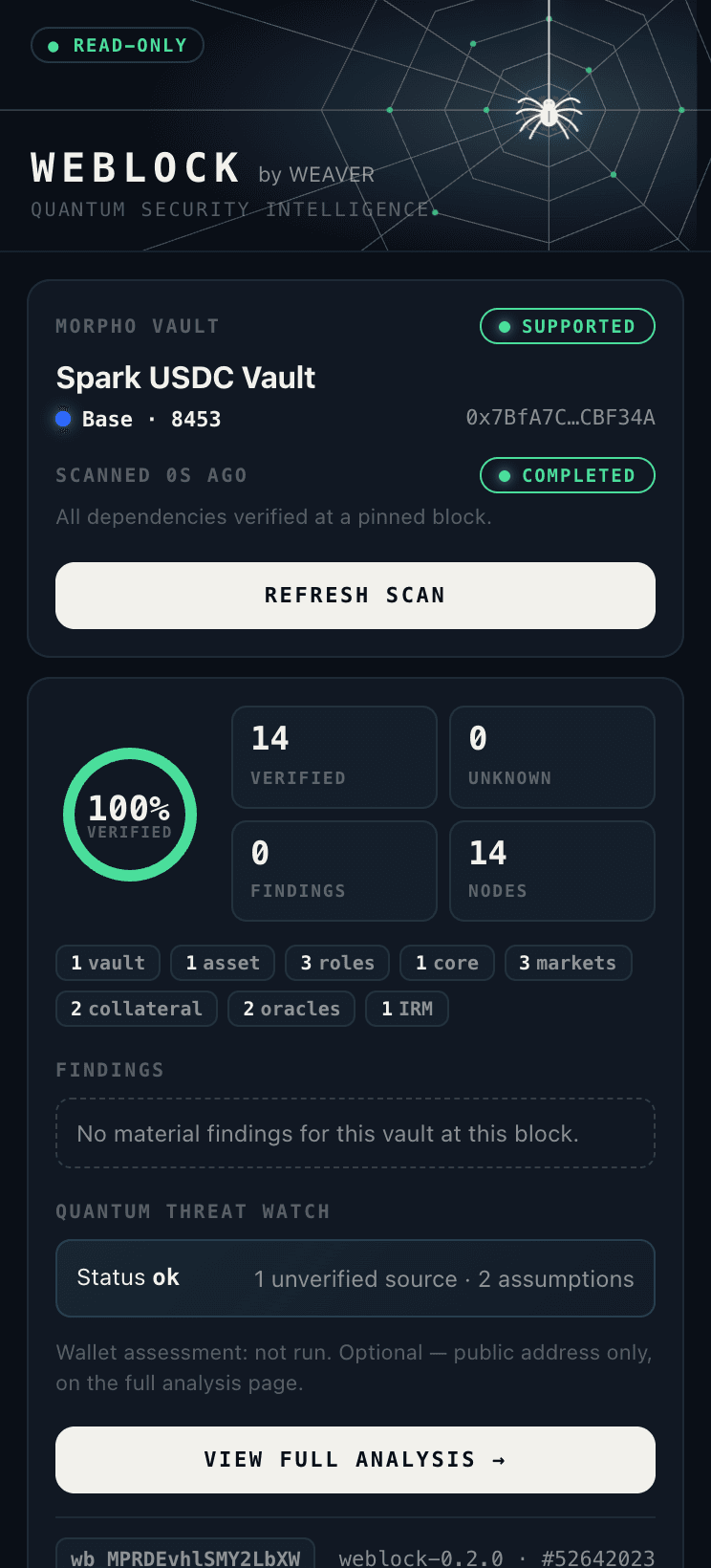
- 3. Run a read-only scan — public chain data only.
- 4. Read the summary: dependencies, freshness, findings.
- 5. View Full Analysis — the same report on weaverloom.tech.
Three features
- Vault Dependency Scanner
Reads the vault's owner, curator, guardian, timelock, asset, markets, collateral, oracles and rate models at one pinned block. Every node links to its on-chain evidence. Anything that cannot be read is shown as unknown — never as safe.
- Wallet & Recovery Assessment
Optional and separate. Paste a public address on the report page to see whether its public key is already revealed on-chain and which recovery options exist. The address is sent in the request body only, never stored, never put in the URL.
- Quantum Threat Watch
Recent quantum-security developments from WEAVER LOOM plus the assumptions behind the assessment. Items are labelled unverified sources — a paper or post is not treated as a confirmed threat.
Install in 8 steps (Chrome, Brave, Edge, Arc)
- 01Download the extension
Download weblock-0.3.0.zip and unzip it. You get a folder containing
manifest.json. Keep this folder — Chrome loads the extension from it. - 02Open the extensions page
In Chrome, Brave, Edge or Arc, go to
chrome://extensions(Edge:edge://extensions). - 03Turn on Developer mode
Toggle Developer mode in the top-right corner. This is needed because WEBLOCK is not yet listed on the Chrome Web Store.
- 04Load unpacked
Click Load unpacked and select the unzipped folder (the one with
manifest.jsondirectly inside). “WEBLOCK by WEAVER” 0.3.0 appears in the list. - 05Pin it
Click the puzzle icon in the toolbar and pin WEBLOCK by WEAVER so the spider icon is always one click away.
- 06Open a supported Morpho vault
Go to one of the supported vaults below on
app.morpho.org/base/vault/…and click the WEBLOCK icon. On any other page the popup says “unsupported” and does nothing. - 07Run the read-only scan
Click Run read-only scan. It takes about 10–20 seconds. The popup shows verified / unknown counts, findings, Threat Watch, the scan time and the report ID + assessment version.
- 08View Full Analysis
Opens
weaverloom.tech/vault-guard/r/wb_…— the same report ID and version — with the dependency graph, evidence, optional wallet check, methodology, limitations and history.
Roadmap
- PHASE 1Initial releaseMorpho Integration
Detect supported Morpho vaults and map verifiable dependencies.
- PHASE 2Initial releaseWEAVER Intelligence
Wallet exposure/recovery assessment and evidence-backed quantum threat monitoring.
- PHASE 3Initial releaseFull Analysis & Public Beta
Extension linked to detailed reports, graphs, evidence and history on WEAVER.
- PHASE 4PlannedAave Integration
Dedicated Aave adapter: markets, assets, oracles, collateral/debt relationships. Each chain and deployment validated independently.
- PHASE 5PlannedKamino Integration
Solana-specific adapter and account/program dependency model — EVM assumptions are not reused blindly.
- PHASE 6PlannedMulti-Protocol Expansion
Further lending protocols chosen by demand, feasibility, data access and security review.
- Cross-protocol monitoring and user-configurable alerts
- Additional chains and account types
- More advanced recovery readiness
- Transaction simulation or warnings — only after separate threat modelling and security review
- Protocol integrations consuming WARD state, where technically and contractually supported
Planned phases are not live and have no committed dates. Aave and Kamino are not supported in the current release.
Updates
WEBLOCK is distributed from this page only — current version v0.3.0. When a new phase ships (for example Aave support), the new version is posted here. To update: download the new zip, replace your WEBLOCK folder with the new one, then click the reload icon on the WEBLOCK card in chrome://extensions. Only install WEBLOCK from weaverloom.tech — copies from other sites are not ours.
Supported vaults
- Open on Morpho ↗Spark USDC VaultBase · 0x7BfA7C4f149E7415b73bdeDfe609237e29CBF34A
- Open on Morpho ↗Gauntlet USDC PrimeBase · 0xeE8F4eC5672F09119b96Ab6fB59C27E1b7e44b61
- Open on Morpho ↗Steakhouse USDCBase · 0xbeeF010f9cb27031ad51e3333f9aF9C6B1228183
Aave, Kamino and other protocols: planned only — not supported.
Permissions & privacy
- activeTab
Reads the URL of the current tab only when you click the icon, to detect the vault.
- weaverloom.tech
The only host it talks to: sends the chain ID and vault address (public data).
- No content script
Nothing is injected into Morpho or any other page, so a page cannot spoof results.
- No wallet access
Never connects a wallet, never asks for a seed phrase, key or signature.
Troubleshooting
- “Manifest file is missing” — you selected the wrong folder. Pick the folder that has manifest.json directly inside.
- Popup says unsupported — the page is not one of the supported vaults, or the URL is not app.morpho.org/base/vault/….
- Scan failed / timed out — nothing was assessed. Try again; if it persists, use the scan on Vault Guard.
- Developer-mode warning on startup — expected for manually installed extensions. You can keep or remove it any time.
FAQ
Does a clean scan mean the vault is quantum-safe?
No. WEBLOCK reports what it could verify at one block. It does not guarantee quantum safety or predict when ECDSA could be broken.
Why isn't it on the Chrome Web Store?
It is a public beta. Until a store listing is live, install it manually as above. Updates: download the new zip, replace the folder and click reload on chrome://extensions.
Does it support Aave, Kamino or Ethereum mainnet Morpho?
Not yet. Only the Morpho vaults on Base listed below are supported. Aave, Kamino and other protocols are planned only.
Is the scan data stored?
Vault reports are stored for 90 days so the extension and website show the same report ID. Wallet checks are never stored.
Does it work on Firefox or Safari?
Not in this release. Chromium browsers only (Chrome, Brave, Edge, Arc).